Your own agent, with the page as context.
Claude Code, Codex, or any agent that speaks the Agent Client Protocol, beside every page, with your team’s own slash commands. No Eidos model, no key, no account: it’s the agent you already run.
Free for macOS, Windows, and Linux. No account, no subscription.

Context
It sees what you see
What you have open goes with each message: a blueprint, a task, a canvas page, a filtered collection. Type @ to pull in any blueprint, task, or asset by its id. Ids in a reply become links you can hover to read.
- The open page attached, and easy to turn off
- @ references to blueprints, tasks, and assets
- Drag a tab onto the composer to attach it

Slash commands
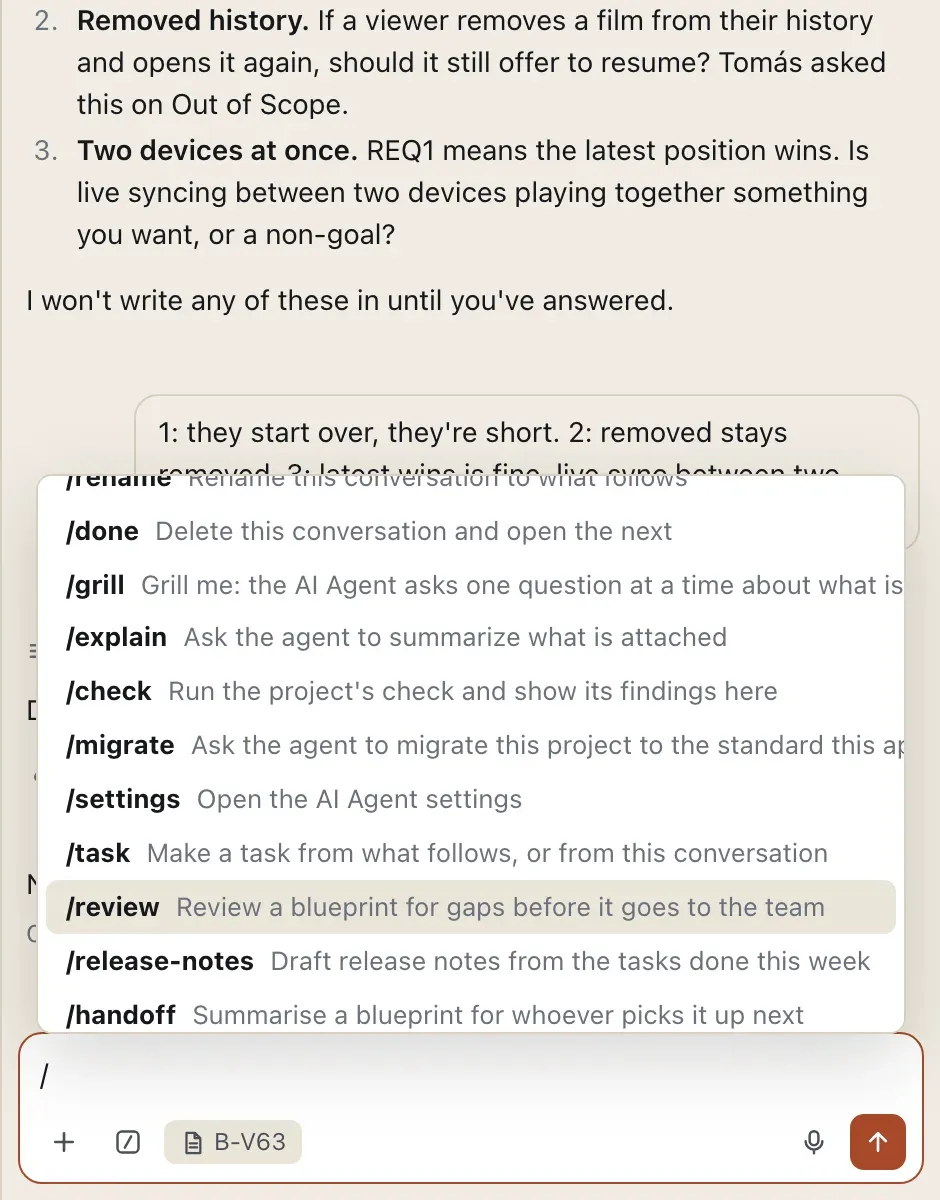
Commands for the work, including your own
Built-in commands run the conversation (/grill, /explain, /check). Plugins add commands for the work (/task, /git-commit). Your team adds its own: a name, a one-line description, and a prompt with $ARGUMENTS, shared with the project or kept on your machine.
- Custom commands, shared or local
- Plugin commands appear when the plugin is on
- Made on the plugin’s page or from a terminal
Bring the agent you already pay for
Pick Claude Code or Codex on the plugin’s page, or point it at any command that speaks the Agent Client Protocol. A connection test tells you it’s found, started, signed in, and answering. One click lets Claude Code run eidos commands without asking each time.
Grilled, not ghost-written
/grill turns the agent into an interviewer. It reads the open blueprint and asks one question at a time about what the text leaves out, in the words of your role. When you’re done, What did we find? lists each gap, your answer, and where it belongs, and offers to write it in.
Talk to it
Press ⇧⌘D and talk. Whisper writes it down on your machine, after a one-time model download. Tidy with AI can clean it up with your agent’s fastest model, and Use literal puts your exact words back.
Several conversations, shared with the team
Up to four agents work at once. Each conversation shows working, waiting for you, or done, and you get a notification when one needs you. Save a conversation with the project, and a teammate can pick it up.
How it connects
The agent works through every other plugin.
Each plugin it touches leaves a record a person can read.
- Blueprints
/checkruns the health check in the chat./migrateappears when the project is behind the standard. - Backlog
/taskmakes a task from the conversation, and Check for duplicates with AI asks whether a new task repeats an old one. - Git
/git-commitcommits what changed in the style of your recent commits. Summarize asks it for a one-line message. - Comments
It replies in a thread signed as the agent, never as you.
- Assets
@offers images and files, with thumbnails.
From the shell
Your commands, from a terminal
Add a command for the whole team, then list every command the composer offers and where each comes from.
$ eidos agent configure:command add review --prompt "Review $ARGUMENTS for gaps"
  /review  Review $ARGUMENTS for gaps
$ eidos agent commands
/grill  ·  Chat view
/task  ·  backlog plugin
/git-commit  ·  git plugin
/review · Custom shared · Review $ARGUMENTS for gapsWrite down what you’re making.
Download Eidos MD, open a folder, and start from the framework closest to your work. You can reshape it all later.
Free for macOS, Windows, and Linux. Your files stay plain text in a folder you own.